T-SQL
002. Getting Started
Datum
- A datum (plural: data) is a single piece of information. It represents the most basic unit of data.
-
Example “42” is a datum representing a person’s age.
Age 42
Data
- Raw facts or values stored in a database (e.g., numbers, text, dates).
-
Example below
Name Age City Alice 30 New York Bob 25 Los Angeles
Table
- A collection of rows and columns that stores data about a specific subject, like Customers or Orders.
Column (Field)
- A named attribute or data category within a table (e.g., Name, Age).
Row (Record)
- A single entry or instance in a table, representing a single item or entity.
Database
A database is an organized collection of data that is stored and accessed electronically. Below are the types of database
SQL (Structured Query Language)
- The standard language for managing and manipulating relational databases using commands like
SELECT,INSERT,UPDATE, andDELETE.
T-SQL (Transact-SQL)
- Microsoft’s extension to SQL that adds procedural logic (e.g.,
IF,WHILE, error handling) and system-level functions.
Database Management Systems
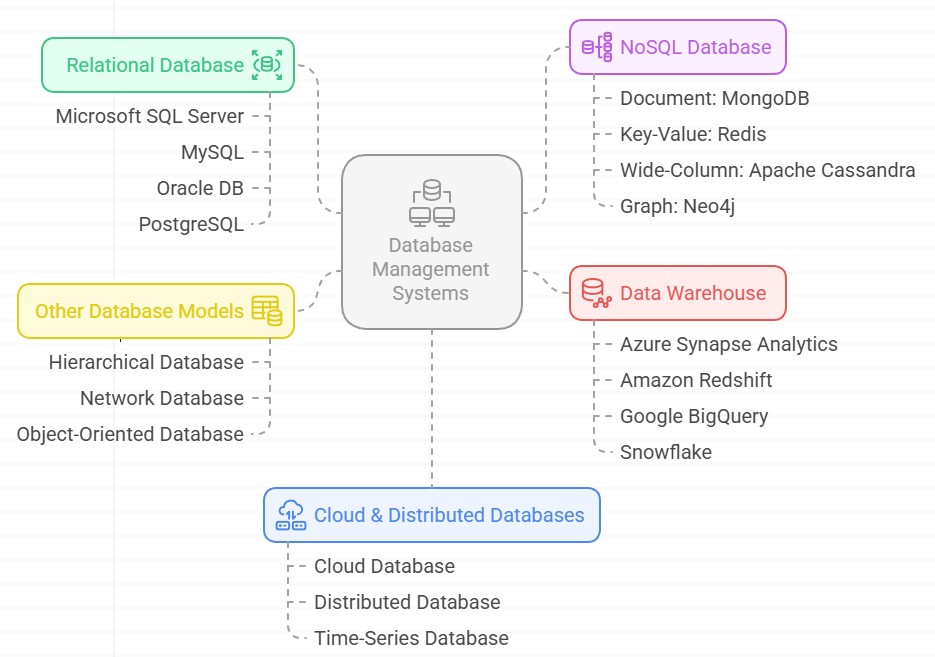
Relational Database (RDBMS)
- A database that organizes data into tables which are related to each other via keys.
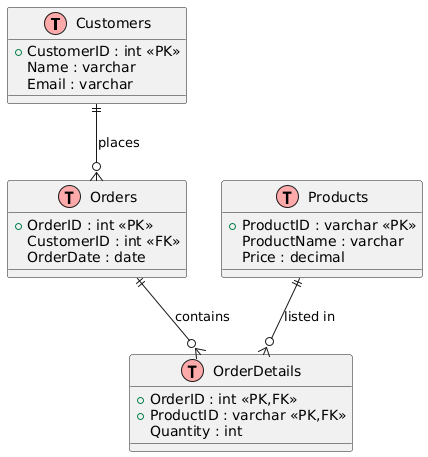
Relational Database Example: Online Store
Imagine a database for an online store with four related tables:
1. Customers Table
| CustomerID | Name | |
|---|---|---|
| 1 | Alice | alice@email.com |
| 2 | Bob | bob@email.com |
- Primary Key:
CustomerID
2. Orders Table
| OrderID | CustomerID | OrderDate |
|---|---|---|
| 101 | 1 | 2024-06-10 |
| 102 | 2 | 2024-06-11 |
| 103 | 1 | 2024-06-12 |
- Primary Key:
OrderID - Foreign Key:
CustomerID→ links to Customers.CustomerID
3. Products Table
| ProductID | ProductName | Price |
|---|---|---|
| P1 | Laptop | 1000.00 |
| P2 | Phone | 500.00 |
- Primary Key:
ProductID
4. OrderDetails Table (to link Orders to Products)
| OrderID | ProductID | Quantity |
|---|---|---|
| 101 | P1 | 1 |
| 101 | P2 | 2 |
| 102 | P2 | 1 |
- Composite Primary Key: (
OrderID,ProductID) -
Foreign Keys:
OrderID→ OrdersProductID→ Products
How It’s “Relational”
Ordersis related toCustomersviaCustomerIDOrderDetailsis related toOrdersandProducts-
You can JOIN these tables in SQL to answer questions like:
“What products did Alice order on June 10?”
Relational Database (RDBMS) Solutions
Microsoft SQL Server
A robust RDBMS by Microsoft, offering enterprise-grade features, scalability, and integration with Windows ecosystems. Widely used in business applications and data analytics.
MySQL
An open-source RDBMS known for its speed, reliability, and ease of use. Powers many web applications, including WordPress, and is a popular choice for startups.
Oracle DB
A high-performance, scalable RDBMS designed for large enterprises. Offers advanced features like partitioning, Real Application Clusters (RAC), and strong security controls.
PostgreSQL
An advanced open-source RDBMS with support for JSON, geospatial data, and custom extensions. Known for its standards compliance and extensibility.
NoSQL Database Solutions
NoSQL databases provide flexible schemas, horizontal scalability, and optimized performance for unstructured or semi-structured data.
Document: MongoDB
A document-oriented NoSQL database storing data in JSON-like formats. Ideal for agile development, real-time analytics, and handling dynamic schemas.
Key-Value: Redis
An in-memory key-value store with sub-millisecond latency. Used for caching, session management, and real-time applications like leaderboards.
Wide-Column: Apache Cassandra
A distributed NoSQL database designed for high availability and linear scalability. Suited for time-series data, IoT, and applications requiring fault tolerance.
Graph: Neo4j
A graph database optimized for managing highly connected data. Used in fraud detection, recommendation engines, and social network analysis.
Other Database Models
Hierarchical Database
Organizes data in a tree-like structure, best suited for systems with parent-child relationships (e.g., file systems, IBM IMS).
Network Database
Extends hierarchical models with many-to-many relationships, following the CODASYL standard. Rarely used today but foundational in early database systems.
Object-Oriented Database
Stores data as objects, supporting inheritance and polymorphism. Used in complex domains like CAD/CAM and scientific applications.
Cloud & Distributed Databases
Cloud Database
Fully managed database services (e.g., Amazon RDS, Azure SQL) offering scalability, backups, and high availability without infrastructure overhead.
Distributed Database
Spreads data across multiple nodes for fault tolerance and scalability (e.g., Google Spanner, Cassandra). Ensures consistency and availability in global systems.
Time-Series Database
Optimized for timestamped data (e.g., IoT, monitoring). InfluxDB and TimescaleDB enable efficient storage and querying of time-based metrics.
Data Warehouse
Centralized repositories for analytical reporting, integrating data from multiple sources.
Solutions
-
Azure Synapse Analytics Unified analytics with big data and SQL integration.
-
Amazon Redshift Cloud-based data warehousing with columnar storage.
-
Google BigQuery Serverless, scalable analytics with SQL support.
-
Snowflake Multi-cloud data warehousing with separation of storage and compute.
When to Use Which Database?
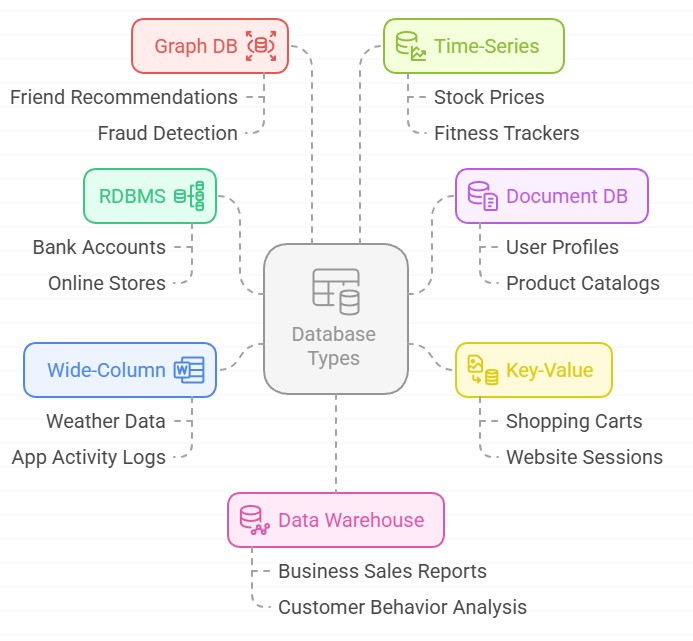
Real World Pizza Shop Example
- Customer database → RDBMS (MySQL)
- Menu items → Document DB (MongoDB)
- Current orders → Key-Value (Redis)
- Delivery routes → Graph DB (Neo4j)
- Oven temperatures → Time-Series (InfluxDB)
- Sales reports → Data Warehouse (BigQuery)
Data Types in T-SQL
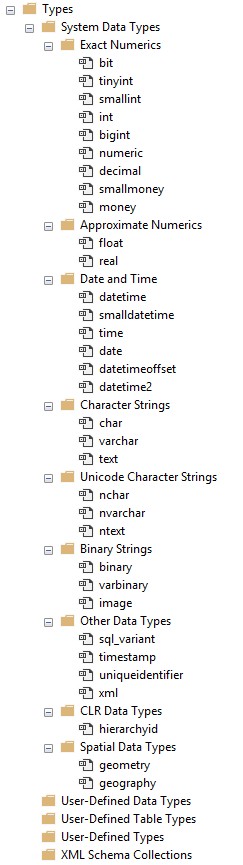
How to View Data Types in SSMS
1. Accessing System & User-Defined Types in Object Explorer
Steps:
- Open SSMS and connect to your SQL Server instance.
- In the Object Explorer panel (left side), expand:
Server Name → Databases → Your_Database (e.g., "AdventureWorks") → Programmability → Types - Explore the subfolders:
- System Data Types: All built-in types (e.g.,
int,varchar,datetime2). - User-Defined Data Types: Alias types you created (e.g.,
PhoneNumberfromvarchar(15)). - User-Defined Table Types: Table-valued parameters (e.g.,
OrderItemsType). - XML Schema Collections: XSD definitions for XML validation.
- System Data Types: All built-in types (e.g.,
Screenshot Guide:
1. Exact Numerics
| Type | Size | Range/Precision | Usage Example | Notes |
|---|---|---|---|---|
bit |
1 bit | 0, 1, or NULL | DECLARE @IsActive BIT = 1; (Boolean flags) |
Optimized for multiple bit columns. |
tinyint |
1 byte | 0 to 255 | DECLARE @Age TINYINT = 30; (Small counts) |
Ideal for status codes. |
smallint |
2 bytes | -32,768 to 32,767 | DECLARE @Qty SMALLINT = 1000; (Inventory) |
Use for medium-range integers. |
int |
4 bytes | -2.1B to 2.1B | DECLARE @ProductID INT = 100000; (PKs) |
Default for IDs/counts. |
bigint |
8 bytes | ±9.2 quintillion | DECLARE @GlobalOrderID BIGINT = 9000000001; |
For very large numbers. |
decimal(p,s) |
5–17 bytes | Up to 38 digits (precision p, scale s) |
DECLARE @Price DECIMAL(10,2) = 99.99; (Currency) |
Exact precision; prefer over float. |
numeric |
=decimal |
Same as decimal |
DECLARE @Pi NUMERIC(9,7) = 3.1415926; (Math) |
Synonym for decimal. |
smallmoney |
4 bytes | -214,748.3648 to 214,748.3647 | DECLARE @Fee SMALLMONEY = 199.99; (Legacy systems) |
Prefer decimal(10,2). |
money |
8 bytes | ±922 trillion | DECLARE @Revenue MONEY = 1500000.99; (Financial) |
Legacy; use decimal(19,4). |
2. Approximate Numerics
| Type | Size | Range | Usage Example | Notes |
|---|---|---|---|---|
float |
4/8 bytes | ±1.79E+308 | DECLARE @Scientific FLOAT = 2.5E-20; (Calculations) |
Avoid for financial data. |
real |
4 bytes | ±3.40E+38 | DECLARE @Temp REAL = 98.6; (Measurements) |
Less precise than float. |
3. Date/Time
| Type | Size | Range/Precision | Usage Example | Notes |
|---|---|---|---|---|
date |
3 bytes | 0001-01-01 to 9999-12-31 | DECLARE @Birthday DATE = '1990-05-15'; |
Date-only storage. |
time(n) |
3–5 bytes | 00:00:00.0000000 to 23:59:59.9999999 | DECLARE @OpenTime TIME(0) = '09:00'; |
Precision n (0–7). |
datetime |
8 bytes | 1753-01-01 to 9999-12-31 (3.33ms) | DECLARE @OrderDate DATETIME = GETDATE(); |
⚠️ Legacy; use datetime2. |
datetime2(n) |
6–8 bytes | 0001-01-01 to 9999-12-31 (100ns) | DECLARE @LogTime DATETIME2(7) = SYSDATETIME(); |
Modern replacement. |
smalldatetime |
4 bytes | 1900-01-01 to 2079-06-06 (1min) | DECLARE @PromoEnd SMALLDATETIME = '2023-12-31 23:59'; |
Low precision. |
datetimeoffset |
10 bytes | 0001-9999 + timezone offset | DECLARE @EventTime DATETIMEOFFSET = '2023-11-15 09:00 +08:00'; |
For global apps. |
4. Character Strings
| Type | Size | Usage Example | Notes |
|---|---|---|---|
char(n) |
Fixed (n bytes) |
DECLARE @CountryCode CHAR(2) = 'US'; |
Padded with spaces. |
varchar(n) |
Variable (1–8,000 bytes) | DECLARE @Email VARCHAR(100) = 'user@example.com'; |
Variable-length ASCII. |
varchar(max) |
Up to 2GB | DECLARE @Description VARCHAR(MAX); |
Replaces text. |
text |
Up to 2GB | ❌ Deprecated (use varchar(max)). |
|
nchar(n) |
Fixed (2n bytes) |
DECLARE @Currency NCHAR(3) = N'USD'; |
Unicode equivalent of char. |
nvarchar(n) |
Variable (2–8,000 bytes) | DECLARE @ProductName NVARCHAR(100) = N'東京タワー'; |
Variable-length Unicode. |
nvarchar(max) |
Up to 1GB | DECLARE @Manual NVARCHAR(MAX); |
Replaces ntext. |
ntext |
Up to 1GB | ❌ Deprecated (use nvarchar(max)). |
5. Binary Data
| Type | Size | Usage Example | Notes |
|---|---|---|---|
binary(n) |
Fixed (n bytes) |
DECLARE @Hash BINARY(32) = 0x4A3B...; |
For fixed-length binary data. |
varbinary(n) |
Variable (1–8,000 bytes) | DECLARE @Thumbnail VARBINARY(8000); |
Variable-length binary. |
varbinary(max) |
Up to 2GB | DECLARE @PDF VARBINARY(MAX); |
Replaces image. |
image |
Up to 2GB | ❌ Deprecated (use varbinary(max)). |
6. Special Types
| Type | Size | Usage Example | Notes |
|---|---|---|---|
uniqueidentifier |
16 bytes | DECLARE @CartID UNIQUEIDENTIFIER = NEWID(); |
GUIDs (globally unique). |
xml |
Up to 2GB | DECLARE @Config XML = '<settings><theme>dark</theme></settings>'; |
Supports XQuery. |
json (stored as nvarchar) |
Variable | DECLARE @ProductJSON NVARCHAR(MAX) = '{"id":123}'; |
SQL Server 2016+. |
hierarchyid |
Variable | DECLARE @OrgNode HIERARCHYID; (Org charts) |
For hierarchical data. |
geometry |
Variable | DECLARE @Location GEOMETRY = POINT(10, 20); |
Flat spatial data. |
geography |
Variable | DECLARE @GPS GEOGRAPHY = POINT(47.6062, -122.3321); |
Earth-based coordinates. |
User-Defined Data Types (UDTs)
1. Alias Types (Based on System Types)
| Type Definition | Base Type | Usage Example | Notes |
|---|---|---|---|
CREATE TYPE SSN FROM CHAR(9); |
CHAR(9) |
DECLARE @CustomerSSN SSN = '123456789'; |
Enforces consistency for SSN fields |
CREATE TYPE Percent FROM DECIMAL(5,2); |
DECIMAL(5,2) |
DECLARE @Discount Percent = 15.50; |
Ensures values 0.00-100.00 |
CREATE TYPE PhoneNumber FROM VARCHAR(15); |
VARCHAR(15) |
DECLARE @ContactPhone PhoneNumber = '+1-800-555-1234'; |
Standardizes phone formats |
Key Points:
- Adds semantic meaning to base types (e.g.,
SSNvs rawCHAR(9)) - Use
CREATE TYPE(modern) instead of legacysp_addtype
2. User-Defined Table Types (UDTTs)
CREATE TYPE OrderItemsType AS TABLE (
    ProductID INT,
    Quantity INT,
    Price DECIMAL(10,2)
);
Usage Example:
DECLARE @Items OrderItemsType;
INSERT INTO @Items VALUES (101, 2, 19.99);
EXEC ProcessOrder @Items;
Key Features:
- Supports PKs, constraints, and indexes
- Memory-optimized versions available
- Ideal for passing multi-row data to stored procedures
3. User-Defined Types (CLR)
C# Definition:
[Serializable]
[SqlUserDefinedType(Format.Native)]
public struct Point3D {
    public double X, Y, Z;
    // Custom methods...
}
SQL Usage:
CREATE TYPE dbo.Point3D EXTERNAL NAME MyAssembly.[Namespace.Point3D];
DECLARE @Location Point3D = CONVERT(Point3D, '10,20,30');
Common Uses:
- Advanced geospatial calculations
- Custom financial algorithms
- Complex data structures
4. XML Schema Collections
Definition:
CREATE XML SCHEMA COLLECTION ProductSchema AS '
<xsd:schema>
  <xsd:element name="Product">
    <xsd:complexType>
      <xsd:sequence>
        <xsd:element name="ID" type="xsd:int"/>
        <xsd:element name="Name" type="xsd:string"/>
      </xsd:sequence>
    </xsd:complexType>
  </xsd:element>
</xsd:schema>';
Validation Example:
DECLARE @Product XML(CONTENT ProductSchema) = '
<Product>
  <ID>100</ID>
  <Name>Widget</Name>
</Product>';
Comparison Table
| Type | Best For | Limitations |
|---|---|---|
| Alias Types | Standardizing column definitions | No custom methods |
| Table Types | Passing multi-row parameters | Cannot be altered after creation |
| CLR Types | Complex business logic | Requires CLR integration |
| XML Schemas | Validating XML structure | XSD processing overhead |
Shopping Cart Table Example
-- Create a new table named 'ShoppingCart' to store shopping cart information
CREATE TABLE ShoppingCart (
    -- A unique identifier for each cart item, automatically generated if not provided
    -- PRIMARY KEY means this uniquely identifies each row in the table
    -- NEWID() generates a new random unique identifier
    CartID UNIQUEIDENTIFIER PRIMARY KEY DEFAULT NEWID(),

    -- Stores the ID of the user who owns this cart item
    -- BIGINT is a large integer type (can store very big numbers)
    -- NOT NULL means this field must always have a value
    UserID BIGINT NOT NULL,

    -- Stores a session identifier (for users who aren't logged in)
    -- VARCHAR(64) means a text field up to 64 characters long
    SessionID VARCHAR(64) NOT NULL,

    -- Stores the ID of the product in this cart item
    -- INT is an integer type (whole numbers)
    ProductID INT NOT NULL,

    -- Stock Keeping Unit - a unique identifier for product variations
    -- CHAR(12) means exactly 12 characters (fixed length)
    SKU CHAR(12) NOT NULL,

    -- The name of the product (up to 100 characters)
    -- NVARCHAR supports international characters
    ProductName NVARCHAR(100) NOT NULL,

    -- Detailed description of the product (unlimited length)
    -- NVARCHAR(MAX) can store very large amounts of text
    ProductDescription NVARCHAR(MAX),

    -- How many of this product are in the cart
    -- SMALLINT is a small integer (range -32,768 to 32,767)
    -- DEFAULT 1 means if not specified, it will be set to 1
    Quantity SMALLINT NOT NULL DEFAULT 1,

    -- The price of one unit of this product
    -- MONEY is a data type for currency values
    UnitPrice MONEY NOT NULL,

    -- Any discount applied to this product
    -- SMALLMONEY is like MONEY but with smaller range
    -- DEFAULT 0.00 means if not specified, no discount is applied
    DiscountAmount SMALLMONEY DEFAULT 0.00,

    -- A calculated field that shows total price for this line item
    -- (quantity × unit price) minus any discount
    -- This value is computed automatically and not stored
    TotalPrice AS (Quantity * UnitPrice - DiscountAmount),

    -- Whether this item should be gift wrapped (1 = yes, 0 = no)
    -- BIT is like a boolean (can be 0 or 1)
    IsGiftWrapped BIT DEFAULT 0,

    -- Cost for gift wrapping (up to 999.99 with 2 decimal places)
    -- DECIMAL(5,2) means 5 total digits with 2 after decimal point
    -- NULL means this can be empty if no gift wrap is selected
    GiftWrapPrice DECIMAL(5,2) NULL,

    -- Stores the product image as binary data
    -- VARBINARY(MAX) can store large binary files like images
    ProductImage VARBINARY(MAX),

    -- Stores product specifications in XML format
    -- XML is a structured data format
    ProductSpecs XML,

    -- Stores additional product attributes in JSON format
    -- JSON is a popular data interchange format
    ProductAttributes JSON,

    -- When this item was added to the cart
    -- DATETIME2 stores date and time with high precision
    -- SYSDATETIME() gets the current date and time
    DateAdded DATETIME2 DEFAULT SYSDATETIME(),

    -- When this cart item was last modified
    LastUpdated DATETIME2 DEFAULT SYSDATETIME(),

    -- When this cart item should expire/be removed
    -- DATE stores just the date (no time)
    ExpiryDate DATE,

    -- Whether this cart item is active (1) or inactive (0)
    -- DEFAULT 1 means items are active by default
    IsActive BIT DEFAULT 1,

    -- Any additional notes about this cart item
    -- VARCHAR(500) means text up to 500 characters
    Notes VARCHAR(500),

    -- Creates a foreign key relationship to the Users table
    -- This ensures the UserID exists in the Users table
    CONSTRAINT FK_UserID FOREIGN KEY (UserID) REFERENCES Users(UserID),

    -- Creates a foreign key relationship to the Products table
    -- This ensures the ProductID exists in the Products table
    CONSTRAINT FK_ProductID FOREIGN KEY (ProductID) REFERENCES Products(ProductID),

    -- Adds a check constraint to ensure quantity is always positive
    CONSTRAINT CHK_Quantity CHECK (Quantity > 0),

    -- Adds a check constraint to ensure prices are never negative
    CONSTRAINT CHK_Price CHECK (UnitPrice >= 0 AND DiscountAmount >= 0)
);

-- Creates an index on the UserID column to speed up searches by user
-- Indexes help the database find data faster
CREATE INDEX IX_ShoppingCart_UserID ON ShoppingCart(UserID);

-- Creates an index on the SessionID column to speed up searches by session
CREATE INDEX IX_ShoppingCart_SessionID ON ShoppingCart(SessionID);
Key concepts explained:
- Data types (INT, VARCHAR, MONEY, BIT, etc.) define what kind of data each column holds
- Constraints (PRIMARY KEY, FOREIGN KEY, CHECK) enforce data integrity rules
- DEFAULT values are used when no value is provided
- NOT NULL means the field is required
- NULL means the field is optional
- Indexes improve query performance
- Computed columns (like TotalPrice) are calculated automatically
General Notes:
- Always choose the smallest data type that will accommodate your data to optimize storage and performance.
- For monetary values, prefer DECIMAL or MONEY types over FLOAT/REAL to avoid rounding errors.
- For new development, prefer DATETIME2 over DATETIME for better precision and range.
- Use NVARCHAR instead of VARCHAR when international character support might be needed.
- Consider using computed columns (like TotalPrice) for derived values to maintain data integrity.
- For large binary data, consider storing file paths in the database and the actual files in a filesystem or blob storage.